
Is Canned Air or an Electric Duster Better for Your Computer?
A computer air duster electric device is almost always the smarter long-term choice over disposable canned air — but the right pick depends on how often you clean and what you’re cleaning.
Quick answer:
| Feature | Electric Air Duster | Canned Air |
|---|---|---|
| Cost over time | Low (one-time buy) | High (buy repeatedly) |
| Environmental impact | Eco-friendly, no propellants | Contains fluorocarbons, adds waste |
| Airflow consistency | Steady and adjustable | Weakens as can empties |
| Safety | No chemicals or inhalant risk | Risk of freezing, chemical residue |
| Best for | Regular cleaners, PC enthusiasts | Occasional, light-duty use |
If you clean your PC, keyboard, or other electronics more than a few times a year, an electric duster pays for itself fast. Canned air is convenient but gets expensive — and the chemicals inside aren’t great for you or the planet.
Dust isn’t just ugly. It clogs fans, traps heat, and quietly shortens the life of your hardware. For health-conscious households, that same dust recirculates through your home air every time a fan spins. Getting it out of your devices matters.
This guide breaks down which electric air dusters are worth buying, what specs actually matter, and how to use them safely on sensitive electronics.
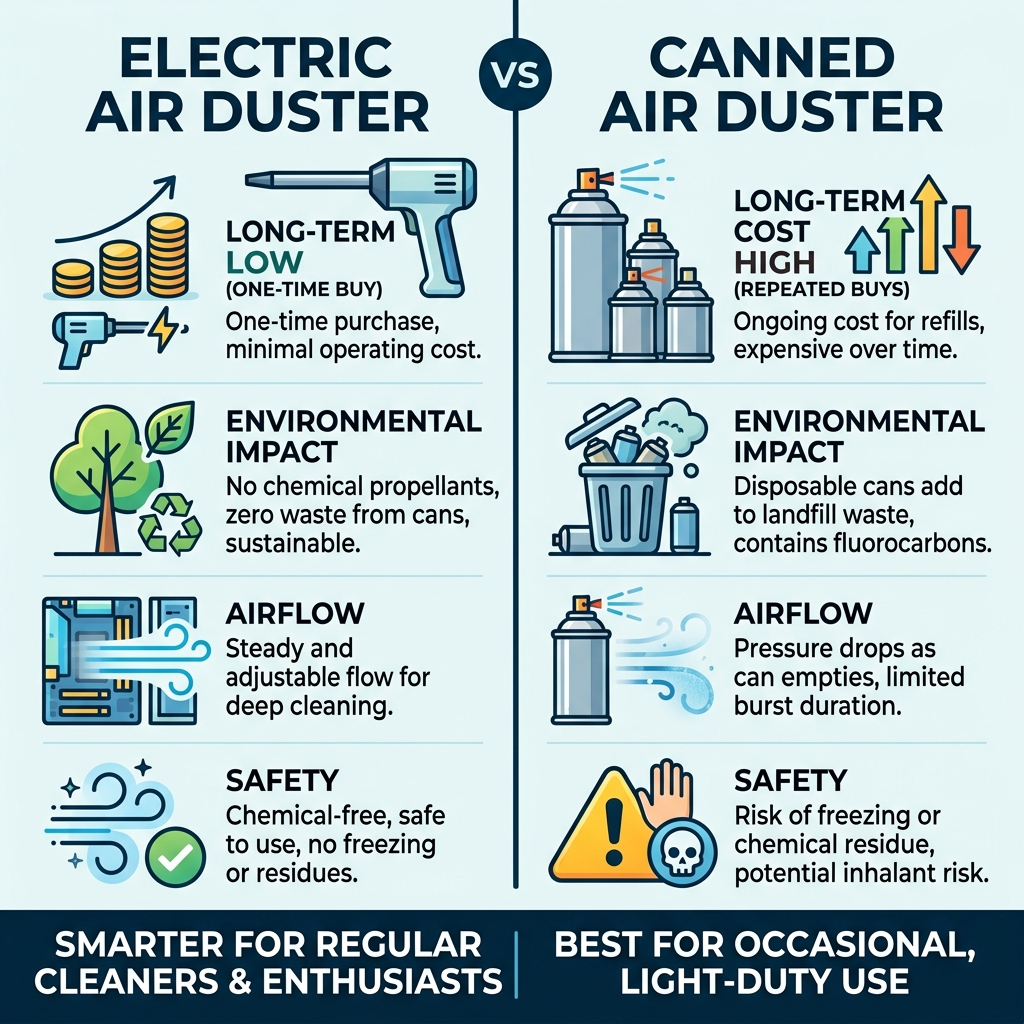
Electric vs. Canned Air: The Ultimate Comparison
When we look at the battle between the traditional “can of air” and the modern computer air duster electric models, it really comes down to a battle of physics and economics. Canned air isn’t actually “air” at all; it’s a liquefied gas propellant. When you spray it, the liquid turns into gas, which is why the can gets freezing cold and the pressure drops off after just a few seconds of use.
In contrast, an electric duster uses a high-speed motor to pull in ambient air and blast it out through a nozzle. This means the pressure stays exactly the same from the first second to the thirtieth minute. We’ve found that for deep-cleaning a dusty motherboard, that consistent pressure is the difference between a “surface clean” and actually removing dust from electronics properly.
| Factor | Canned Air Duster | Electric Air Duster |
|---|---|---|
| Chemicals | Contains fluorocarbons/bitterants | 100% Breathable Air |
| Residue | Can leave “freezer burn” or liquid | Zero residue |
| Longevity | 10-15 minutes of total use | Years of service |
| Pressure | Decreases as can cools | Constant and powerful |
| Safety | Flammable, inhalant risk | Non-toxic, safe for home |
Why a Computer Air Duster Electric Beats Canned Air
The most immediate “win” for the electric version is the lack of chemicals. If you’ve ever used canned air in a small room, you know that distinct, slightly metallic smell. Those are fluorocarbons. Not only are they bad for the ozone layer, but they also pose a “huffing” or inhalant risk, which is why many manufacturers add bitterants to the mix.
By switching to a computer air duster electric, we eliminate those toxins entirely. You get a reusable tool that provides a “greener” power source for your cleaning routine. Plus, you never have to worry about that annoying moment when the can starts spraying liquid because you tilted it slightly too far—a mistake that can actually short-circuit a live component. For more on keeping your workspace healthy, check out our dusting tips for better air quality.
Environmental and Economic Benefits
Let’s talk numbers. A single high-quality electric duster might cost between $40 and $100. A pack of three air cans costs about $20. If you are a gamer or a professional who cleans their gear once a month, you’ll go through those cans in less than a year.
An electric duster is a one-time investment. We’ve seen high-end models like the MetroVac DataVac last for over a decade in professional repair shops. From an environmental standpoint, you are preventing dozens of steel cans from hitting the landfill and stopping the release of greenhouse gases used as propellants. It’s a rare win-win for your wallet and the planet.
Choosing the Best Computer Air Duster Electric for Your Setup
Not all dusters are created equal. When we go shopping for a computer air duster electric, we usually see two main categories: the “heavy-duty corded” blowers and the “sleek cordless” rechargeables.

- Corded Models: Think of these as miniature leaf blowers for your desk. Models like the DataVac ED-500 feature 500-watt motors and move a massive 51 CFM (Cubic Feet per Minute) of air. They are incredibly powerful but require a wall outlet.
- Cordless Models: These have exploded in popularity recently. Brands like WOLFBOX, Newhouse Electric, and XPOWER offer units that reach staggering speeds—up to 150,000 RPM. They are portable, USB-C rechargeable, and perfect for quick keyboard touch-ups or cleaning out the car.
Key Specs for Your Computer Air Duster Electric
When you’re comparing models on Newegg or Amazon, don’t get blinded by the marketing jargon. Here is what we look for to ensure the tool actually has the “oomph” to dislodge stubborn dust:
- RPM (Rotations Per Minute): This measures how fast the internal fan spins. High-end cordless units usually range from 51,000 RPM to 110,000 RPM. Some “turbo” models even claim 150,000 RPM.
- CFM (Airflow): This is arguably more important than RPM. It measures the volume of air moved. A corded 500W motor usually wins here, providing a “wall of air” that clears a PC case in seconds.
- Battery Capacity (mAh): For cordless units, look for at least 6000mAh to 7500mAh. This typically gives you 20–40 minutes of continuous “blast time,” which is plenty for several full PC cleanings.
- Brushless Motors: These are quieter, more efficient, and last much longer than older brushed motors. Most top-rated models (like the Vantrue T150 or Shop-Vac Electric Duster) use these.
- Speed Settings: Having 3-gear adjustable speeds is vital. You don’t always want 100,000 RPM hitting a delicate fan bearing or a loose keycap.
Versatility Beyond the PC Case
One of our favorite things about the computer air duster electric is that it isn’t a one-trick pony. While canned air is too expensive to “waste” on non-electronics, an electric duster invites you to clean everything.
- Keyboard Crevices: Use a brush nozzle to dislodge crumbs while the air blasts them away.
- Car Detailing: Perfect for blowing dust out of AC vents or crumbs from under the seats.
- Household Chores: We use them to clean window tracks, blinds, and even the filters in our air purifiers.
- Inflation: Many models, like the XPOWER A-3B or the CORN 2-in-1, come with nozzles to inflate pool toys, air mattresses, or yoga balls.
- Vacuum Functions: Some 2-in-1 models allow you to flip the device around to suck up the dust you just blew out, though these are generally less powerful than dedicated vacuums.
Safety and Best Practices for Cleaning Sensitive Electronics
We’ve all heard the horror stories: “I used an air compressor and blew a capacitor off my motherboard!” While a computer air duster electric is much safer than a garage air compressor, you still need to follow some ground rules to protect your expensive hardware.
Preventing Component Damage
- The “Fan Rule”: This is the most important tip. When blowing air into a PC fan (CPU, GPU, or case fans), hold the blades still with your finger or a toothpick. If the air duster spins the fan too fast, it can act as a generator, sending electricity back into the motherboard and causing a short. It can also ruin the fan’s bearings.
- Maintain Distance: Start about 6 inches away. If the dust doesn’t move, move closer. High-speed air can occasionally dislodge loose jumpers or stickers.
- Watch for Static: While most electric dusters are made of ABS plastic to minimize ESD (Electrostatic Discharge) hazards, it’s always a good idea to use cleaning tips that include grounding yourself before touching the internal components.
- Thermal Protection: High-speed motors get hot. If the handle feels toasty, give it a 10-minute break. Most quality units like the Vantrue T150 have built-in overheat protection.
Maintenance of the Duster Itself
To keep your duster running for years, you have to treat it like the power tool it is. Most units have a small foam filter at the intake. We recommend checking this once a month—if it’s clogged with dust, the motor has to work harder, which leads to burnout. Wash the filter in warm water, let it dry completely, and pop it back in.
For cordless models, avoid leaving them on the charger for days at a time. Most use Lithium-ion batteries (like the 7500mAh CORN model), which prefer to stay between 20% and 80% charge for maximum longevity.
Frequently Asked Questions about Electric Dusters
Can an electric duster damage my motherboard?
Generally, no. As long as you aren’t physically ramming the nozzle into the board or letting the fans spin at 50,000 RPM, the air itself won’t hurt the components. The main risk is ESD (static), but most modern computer air duster electric tools are designed with anti-static housings to prevent this.
How long do cordless electric dusters last on a single charge?
Most 7500mAh models provide about 30–40 minutes of continuous use on the “Low” setting and about 15–20 minutes on “Turbo.” Since you usually only blast air in 5-second bursts, one charge can easily last through 5 to 10 full PC cleanings.
Are electric dusters louder than canned air?
Yes, significantly. Canned air makes a “hiss,” while an electric duster sounds like a high-pitched hair dryer or a small vacuum. If you are cleaning in a quiet office, people will definitely notice. However, the trade-off in power and cost is usually worth the 60–80 decibels of noise.
Conclusion
So, is a computer air duster electric worth the money? If you own a computer, the answer is a resounding “Yes.” It is safer for your hardware, better for the environment, and will save you a small fortune in “canned air” costs over the next few years.
Whether you choose a heavy-duty corded beast like the DataVac for your home office or a portable cordless unit for your laptop bag, you’re making an investment in the longevity of your tech. Keep those fans spinning and that hardware cool! For more expert advice on maintaining your gear, explore our expert cleaning tips.
