
Why Dust Is Your Electronics’ Worst Enemy
Prevent dust in electronics and you can add years to the life of your devices — here’s how to do it fast:
Quick ways to prevent dust buildup on electronics:
- Elevate devices off the floor — raising a PC tower just 6 inches cuts dust intake by up to 80%
- Use dust covers when devices are idle
- Clean intake vents with compressed air every 3-6 months
- Run a HEPA air purifier near your workstation
- Keep humidity between 40-60% to reduce static electricity
- Vacuum carpets and upholstery regularly to cut airborne dust at the source
You wipe down your computer, and by the next morning it’s dusty again. Sound familiar?
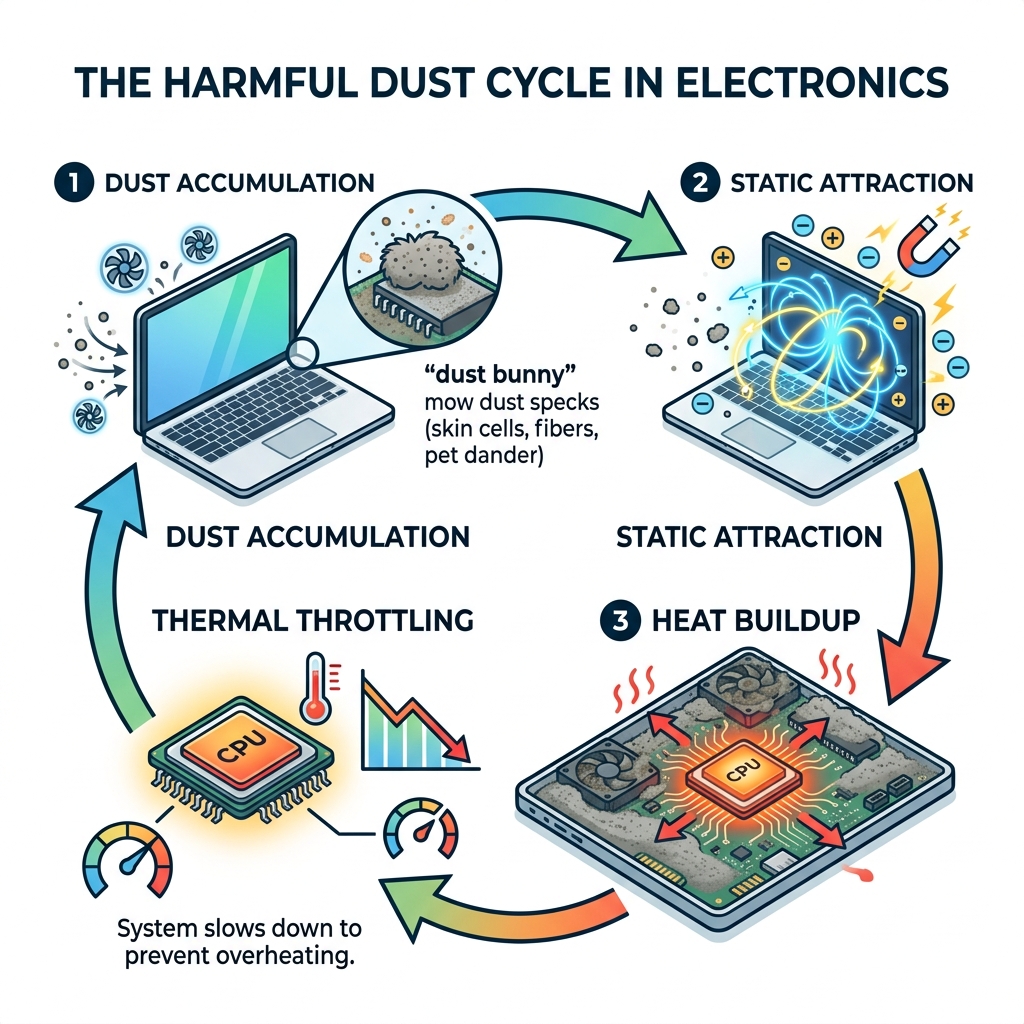
It’s not just bad luck. Electronics are actively pulling dust toward them — through static electricity, heat, and spinning cooling fans. Every powered-on device is essentially running a slow, invisible vacuum cleaner that coats its own insides with grime.
And the stakes are real. Dust doesn’t just look bad. It acts as a thermal blanket on sensitive components, trapping heat that leads to slowdowns, crashes, and in worst cases, permanent damage. For a health-conscious home, it also means more allergens — dead skin cells, pollen, pet dander, and fabric fibers — circulating through the air your family breathes.
The good news? Prevention is simpler than you think. A few smart habits and the right setup can dramatically slow dust accumulation and keep your gadgets running cool and clean.
Why Your Devices Are Dust Magnets
Have you ever noticed that your TV screen or computer monitor seems to grow a “fur coat” of dust faster than your wooden coffee table? It isn’t your imagination. Office and home electronics are uniquely designed to attract debris.
The primary culprit is static electricity. When your devices are powered on, the movement of electrons creates a low-level electromagnetic field. This field acts like a magnet for airborne particulates. Because dust particles often carry a slight charge themselves, they are physically pulled toward your screens and casings.
Furthermore, most high-performance electronics rely on active cooling. This means they have internal fans designed to pull cool air in and push hot air out. Unfortunately, these fans don’t just pull in air; they suck in everything floating in it—skin cells, pet hair, and lint. Once inside, this debris settles on the warm surfaces of circuit boards and heat sinks. If you want to dive deeper into the mechanics of this, check out our guide on Removing Dust from Electronics.
The Role of Static and Airflow to Prevent Dust in Electronics
To effectively prevent dust in electronics, we have to understand the “suction” cycle. Most computers and gaming consoles have intake vents. As the internal fans spin, they create negative pressure inside the device, drawing in air from the surrounding environment. If your room is filled with common indoor air pollutants, those pollutants end up inside your motherboard.
Static electricity further complicates things by making the dust “sticky.” Instead of just blowing through the device, the particles cling to the fan blades and the tiny fins of the heat sinks. Over time, this creates a thick, felt-like layer that becomes increasingly difficult to remove with just a simple wipe.
Risks of Accumulation: From Overheating to Fire Hazards
What happens if you ignore that layer of gray fuzz? The consequences range from annoying to dangerous.
- Thermal Throttling: Dust acts as a thermal insulator. When your CPU or GPU is covered in dust, heat cannot escape. To prevent itself from melting, the device will “throttle” or slow down its performance. If you’ve noticed your computer lagging during simple tasks, dust might be the reason.
- Component Friction: Dust that gets into the bearings of cooling fans causes friction. This makes the fans work harder, creating more noise and eventually leading to fan failure.
- Short Circuits: Certain types of dust—especially in industrial or workshop settings—can be conductive. If enough of this accumulates on a circuit board, it can create a bridge between electrical contacts, leading to a short circuit.
- Fire Hazards: While rare, extreme dust buildup combined with high heat can create a fire risk. Dust is highly flammable, and if a component sparks or reaches a critical temperature, that “blanket” of dust can ignite. This is a particularly unseen challenge in apartments where ventilation might already be limited.
Strategic Placement to Prevent Dust in Electronics
One of the most effective ways we can prevent dust in electronics is simply by changing where they sit. Most people tuck their PC towers under their desks, directly on the floor or carpet. This is the “dust danger zone.”

The 6-Inch Rule
Gravity ensures that the heaviest concentration of dust, pet hair, and carpet fibers stays within a few inches of the floor. By simply elevating your computer tower or gaming console just 6 inches (15 cm) off the ground, you can reduce the amount of dust it sucks in by up to 80%. Using a simple desk riser or a small shelf makes a massive difference in long-term maintenance. For more on how environmental factors affect your gear, read about dust and allergens in your home.
Optimizing Airflow and Device Spacing
We often see “tech nests”—clumps of devices, external hard drives, and routers all squeezed together behind a monitor. This is a recipe for disaster. When devices are too close together, they trap pockets of hot air, which encourages fans to spin faster and draw in more dust.
- Vent Clearance: Ensure there are at least 3-4 inches of open space around every intake and exhaust vent.
- Cable Management: Tangled cables act like a net, trapping dust bunnies and blocking airflow. Use Velcro ties or cable sleeves to keep the area behind your desk clear. This not only helps with cooling but also makes it much easier to vacuum the area.
- Furniture Gaps: Don’t push your desk flush against the wall. Leaving a small gap allows for better air circulation, which is one of the essential tips for preventing indoor air pollution.
Positive Pressure and Fan Configuration
For those with custom-built PCs, you can actually “engineer” your way out of a dust problem. This is called positive pressure.
If you have more fans blowing air into the case (intake) than fans blowing air out (exhaust), the air will naturally try to escape through every little crack and seam in the computer case. This prevents dust from seeping in through un-filtered gaps. However, this only works if your intake fans have high-quality filters installed. Remember to check your air filter replacement schedule for both your PC and your home HVAC system to keep the air clean.
Environmental Controls and Protective Barriers
If the air in your room is clean, your electronics stay clean. It’s a simple equation. We recommend a multi-layered approach to environmental control.
Humidity Control: The Sweet Spot
Static electricity thrives in dry air. If your home’s humidity drops below 30%, your gadgets become high-powered dust magnets. Conversely, if it’s too humid (above 60%), dust can become damp and “clump,” making it stick to internal components like glue. We suggest keeping your indoor humidity between 40% and 60%. This reduces static attraction and keeps dust in a state where it can be easily filtered or vacuumed.
Using Covers and Filters to Prevent Dust in Electronics
If you have devices you don’t use every day—like a printer, a secondary monitor, or a gaming console—use a dust cover.
- Materials: Look for non-conductive, anti-static fabrics or specialized plastic covers.
- Idle Protection: Even a simple soft cloth draped over a powered-down device can prevent the “overnight settle” of dust.
- Magnetic Mesh: For computers, you can buy magnetic dust filters that snap onto the outside of your intake vents. These are incredibly easy to pop off, rinse under a tap, and snap back on. Keeping these clean is just as important as knowing how to clean your microfiber cloths.
Maintaining a Clean Workspace
Your carpet is a giant dust reservoir. Every time you walk across it, you kick up thousands of particulates that eventually find their way into your laptop’s vents.
- Vacuuming Frequency: In rooms with heavy electronics usage, vacuum at least twice a week. If you have pets, daily is better.
- HEPA is Key: Use a vacuum with a certified HEPA filter. Standard vacuums often suck up large dust and blow out the microscopic particles—the very ones that electronics hate most. Vacuuming for allergen reduction is a vital part of tech maintenance.
- Pet Management: We love our furry friends, but their dander is an electronics killer. Keep pet beds away from your computer setup and follow specific cleaning tips for pet owners to manage the shed.
Step-by-Step Cleaning for Maximum Longevity
Even with the best prevention, some dust will eventually get in. When it does, you need to remove it safely.
Safe Removal Techniques
Before you start, always unplug the device.
| Tool | Best For | Pro Tip |
|---|---|---|
| Compressed Air | Vents, heat sinks, keyboards | Use short bursts. Never shake the can or hold it upside down, as liquid propellant can spray out. |
| Microfiber Cloth | Screens, outer casings | Never use paper towels; they can scratch delicate coatings. |
| Anti-Static Brushes | Fan blades, circuit boards | Use these to gently dislodge “caked-on” dust that air won’t move. |
| 99% Isopropyl Alcohol | Sticky residue, PCB cleaning | It evaporates almost instantly and doesn’t leave conductive residue. |
When cleaning fans with compressed air, hold the fan blade still with a finger or a toothpick. Allowing the air to spin the fan at high speeds can generate electricity that might damage the motherboard, or it can ruin the fan’s bearings. This level of care is similar to how you should treat your home’s AC vents during cleaning.
Professional Maintenance Schedules
We recommend a tiered cleaning schedule to keep things running smoothly:
- Bi-Weekly: Wipe down screens and external surfaces with a dry microfiber cloth.
- Monthly: Check intake filters. If they are gray or fuzzy, wash or vacuum them.
- Semi-Annually: Perform a “deep clean.” Open your PC case or use compressed air on console vents to clear out internal accumulation.
In industrial environments or homes with heavy renovations, these intervals should be tripled. Consistent maintenance is the most cost-effective way to prevent indoor pollution and equipment failure.
Frequently Asked Questions about Electronics Dust
What is office dust actually made of?
It’s a bit gross, but office dust is a cocktail of human and environmental waste. It typically consists of dead skin cells (the primary ingredient!), fabric fibers from clothing and carpets, soil tracked in by shoes, pollen, and even microscopic food particles. Because many of these are organic, they can actually hold moisture, which increases their ability to stick to your gadgets.
Can dust buildup really cause a fire?
Yes, though it usually requires a “perfect storm” of neglect. Dust acts as an insulator, causing components to run much hotter than intended. If a wire becomes frayed or a capacitor fails and creates a spark, the dry, fibrous dust acts as tinder. Keeping your vents clear is a vital safety measure.
How does humidity affect dust in my gadgets?
Humidity is all about static. In low humidity, electrons build up on surfaces, creating the static charge that pulls dust in. In high humidity, dust absorbs moisture, becoming heavier and more “adhesive.” Keeping your room at 40-60% humidity is the “Goldilocks zone” for electronics—not too dry for static, and not too damp for clumping.
Conclusion
At the end of the day, to prevent dust in electronics is to protect your investment. Whether it’s a high-end gaming rig, a work laptop, or your home entertainment system, dust is a silent performance killer. By elevating your devices, managing your home’s environment, and sticking to a simple cleaning schedule, you can ensure your gadgets stay fast, quiet, and safe for years to come.
We know that keeping a home or office truly dust-free can feel like a full-time job. If you’re looking for more ways to improve your indoor environment, get expert help with our professional cleaning tips. Happy cleaning!
