
Your Electronics Are Dirtier Than You Think
This electronics dusting tools guide covers the best products to keep your devices clean, cool, and running longer:
| Tool | Best For | Key Benefit |
|---|---|---|
| Microfiber cloth | Screens, casings | Lint-free, scratch-safe |
| Compressed air / electric duster | Keyboards, vents, ports | Blasts dust from tight spaces |
| Anti-static (ESD-safe) brush | PCBs, sensitive components | Removes dust without static damage |
| Isopropyl alcohol (70-99%) | Contacts, sticky grime | Fast-drying, residue-free |
| Cotton swabs | Ports, crevices, small buttons | Precision cleaning |
| Contact cleaner | Electrical connectors | Deoxidizes and restores conductivity |
Your phone, laptop, and game console have something in common: they’re all collecting dust right now.
That dust isn’t just an eyesore. It insulates heat inside your devices, forces fans to work harder, and can even create electrical problems on circuit boards. Dust also traps allergens like pet dander and dust mites — which means dirty electronics can quietly affect the air your family breathes every day.
The good news? You don’t need a professional or expensive gear to fix it. The right tools make this easy, safe, and fast.
Below, we’ll walk you through exactly what to use — and what to avoid — so you can protect your devices and your home’s air quality at the same time.

Why Regular Maintenance is Critical for Your Tech
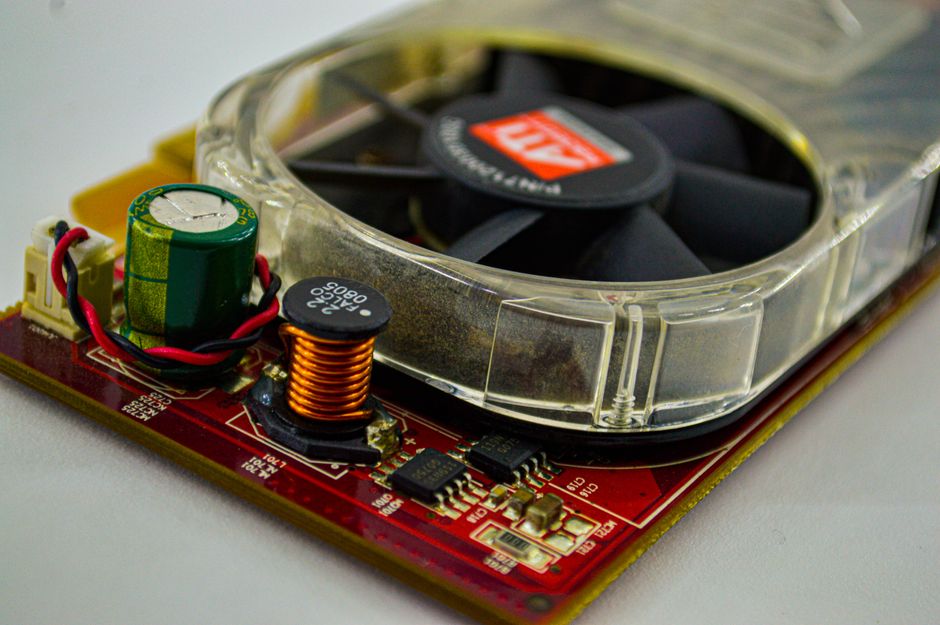
We often think of dusting as a cosmetic chore, like vacuuming the rug or wiping the baseboards. However, when it comes to our gadgets, dust is a silent performance killer. Most modern electronics generate significant heat during operation. To keep things running smoothly, they rely on cooling systems—fans, heatsinks, and vents—to move that heat away from sensitive chips.
When dust accumulates, it acts like a thermal blanket. It coats internal components, trapping heat and forcing your device into thermal throttling. This is when your computer or game console intentionally slows itself down to prevent melting its own parts. If left unchecked, this heat buildup eventually leads to hardware failure, potentially turning your expensive laptop into a very high-tech paperweight.
Beyond the hardware, there is the human element. Electronics are static magnets, literally pulling floating particles out of the air. This includes dust mites, pet dander, and pollen. Every time your PC fan kicks on, it can circulate these allergens back into your breathing zone. For more on how keeping your home tidy helps your lungs, check out our Dusting Tips for Better Air Quality.
Preventing Damage and Reducing Health Risks
The microscopic world inside your computer is surprisingly fragile. Dust isn’t just “dirt”; it is often a mix of textile fibers, dead skin cells, and microscopic debris. In some environments, it may even contain conductive metal particles or oily residues.
- Short Circuits: Conductive dust can bridge the tiny gaps between electrical pathways on a circuit board, causing a short circuit.
- Signal Interference: Even non-conductive dust can absorb moisture from the air, promoting corrosion and causing signal “noise” or ground loops.
- Respiratory Issues: For those of us with allergies, a dusty game controller or a clogged laptop vent is a constant source of irritation. Research shows that household dust is a primary breeding ground for dust mites, which can trigger asthma and other respiratory issues.
By following a proper electronics dusting tools guide, we aren’t just cleaning; we are performing preventative maintenance that extends the life of our gear and keeps our air fresh.
The Essential Electronics Dusting Tools Guide
If you are looking for the best electronics cleaning products, you don’t need a massive industrial kit. A few well-chosen items will handle 99% of your needs. We recommend building a small “tech cleaning kit” that you keep in a dedicated drawer or bag.
Essential items include:
- Microfiber Cloths: The gold standard for screens.
- Compressed Air or Electric Dusters: For blowing out debris.
- Soft Brushes: For detailing and “sweeping” away loose particles.
- Cotton Swabs: For precision work in ports and between keys.
For a deeper dive into the specific types of cloths you should use, visit our Microfiber Cloth Dusting Guide.
Compressed Air Cans vs. Electric Air Dusters
One of the most common questions we get is whether to stick with traditional “canned air” or upgrade to a rechargeable electric duster. Here is how they stack up:
| Feature | Compressed Air Cans | Electric Air Dusters |
|---|---|---|
| Cost | Low initial cost ($5-$10 per can) | Higher initial cost ($40-$80) |
| Sustainability | Disposable; creates waste | Reusable; eco-friendly |
| Safety | Can spray liquid propellant if tilted | Air only; no chemical propellants |
| Power | Powerful but loses pressure as it gets cold | Consistent high-velocity airflow |
| Best For | Occasional use; small kits | Frequent cleaners; PC enthusiasts |
Microfiber Cloths: The Foundation of Your Electronics Dusting Tools Guide
Not all cloths are created equal. We have all tried using an old t-shirt or a paper towel to wipe a screen, only to end up with more lint or, worse, tiny scratches.
Microfiber is essential because the fibers are split into tiny “hooks” that grab and hold dust rather than just pushing it around. When cleaning screens, always use a dry microfiber cloth first. Use gentle, circular motions to lift dust. For stubborn fingerprints, you can slightly dampen the cloth with distilled water—but never spray the screen directly!
Air Dusters and Brushes: Expanding Your Electronics Dusting Tools Guide
When it comes to the nooks and crannies of a keyboard or the cooling vents of a PlayStation 5, a cloth won’t cut it. This is where air comes in.
- Compressed Air Tips: Always hold the can upright. If you tilt it, you might spray liquid propellant onto your sensitive circuits. Use short, 1-second bursts. Long sprays cause the can to freeze, which drops the air pressure.
- Electric Dusters: These are a game-changer for anyone with multiple devices. They provide a continuous stream of air and often come with brush attachments that help dislodge “stuck” dust.
- ESD-Safe Brushes: If you are opening up your computer, you need brushes with conductive fibers (like carbon fiber). Standard plastic or nylon brushes can generate static electricity. In electronics, a tiny static spark as low as 30 volts—which you can’t even feel—is enough to fry a delicate chip.
Specialized Tools for Precision and Internal Cleaning
Sometimes, dust gets “sticky,” or you need to clean the actual brain of the machine: the Printed Circuit Board (PCB). This requires a more surgical approach. If you’re nervous about opening your devices, our guide on Removing Dust from Electronics provides a safe starting point.
Advanced Maintenance for PCBs and Sensitive Components
When we move from external dusting to internal maintenance, we need specialized chemicals and grounding tools.
- Isopropyl Alcohol (IPA): We recommend 99% concentration for internal parts. Isopropyl alcohol evaporates almost instantly and leaves zero residue. It’s perfect for cleaning RAM slots, CPU sockets, and motherboard surfaces.
- Contact Cleaners: If your USB ports are flaky or your game controller has “stick drift,” a specialized contact cleaner (like DeoxIT) can deoxidize the metal surfaces and restore a solid connection.
- Anti-Static (ESD) Mats and Straps: Before you touch the inside of a PC, you should ground yourself. An anti-static wrist strap connects you to a grounded metal object, ensuring that any static buildup on your body is safely discharged before you touch a $500 graphics card.
- Adhesive Putty: A clever trick for cleaning headphone grilles or speaker meshes is using a small ball of adhesive putty (like Blu-Tack). Gently press it into the grille and pull it away to lift out earwax and fine dust that a brush might miss.
Common Mistakes and Safety Protocols
Even with the best electronics dusting tools guide, things can go wrong if you use the wrong technique. We have seen many well-intentioned people accidentally damage their gear by being “too thorough.”
Safe Cleaning Agents vs. Substances to Avoid
The most important rule of electronics cleaning is: Never spray anything directly onto the device. Always apply the liquid to your cloth or swab first. This prevents moisture from seeping into ports or behind screen bezels, where it can cause permanent damage.
What to Avoid:
- Ammonia and Bleach: These are far too harsh for electronics. Ammonia-based glass cleaners (like Windex) can eat away at the anti-reflective coatings on monitors and TVs.
- Vinegar: While great for kitchen counters, the acidity in vinegar can damage the oleophobic (oil-repellent) coatings on smartphone screens over time.
- Paper Towels and Tissues: These are made of wood pulp and are surprisingly abrasive. They will leave micro-scratches on glossy plastics and screens.
- Vacuum Cleaners: Standard household vacuums are static-generating machines. Using a plastic vacuum nozzle near a motherboard is a recipe for disaster. If you must use a vacuum, use it at a distance to catch the dust you are blowing out with compressed air.
Frequently Asked Questions about Electronics Dusting
How often should various electronic devices be dusted or cleaned?
The “right” frequency depends on your environment. If you live in a house with three shedding dogs and a wood-burning stove, you’ll need to clean much more often than someone in a minimalist, pet-free apartment.
- Desktop PCs: We recommend a light internal dusting every 6 months. If you start hearing your fans getting louder or “whining,” that’s a sign they are struggling against dust buildup.
- Laptops and Tablets: Wipe the screens weekly. Blow out the side vents every 3 months.
- Keyboards and Mice: These are high-touch items. Give them a quick wipe with 70% isopropyl alcohol weekly to kill germs and remove skin oils.
- Industrial/Office Settings: In high-traffic or dusty environments, quarterly deep cleans of servers and workstations are a must.
Is 70% isopropyl alcohol safe to use on all electronics?
Generally, yes—but with a few caveats. 70% IPA is excellent for disinfecting hard surfaces like keyboards, mice, and the backs of phones. However, be careful with screens. Many modern displays have specialized coatings. While Apple recently updated their guidelines to say 70% alcohol wipes are okay for their screens, we still prefer using a dry microfiber cloth or a dedicated screen cleaner whenever possible to be safe.
For internal circuitry, always aim for 99% IPA, as the lower water content in 70% alcohol means a slightly longer drying time and a higher (though still low) risk of leaving a tiny bit of residue.
Can I use a household vacuum cleaner to remove dust from my PC?
We strongly advise against it. The main issue isn’t the suction—it’s the static electricity. As air and dust particles rush through a plastic vacuum hose, they generate a significant static charge. If that nozzle gets near a sensitive component, it can discharge and kill the part instantly.
If you have a massive amount of dust inside a PC case, the safest method is to take the tower outside and use an electric duster or compressed air to blow the dust out. If you must use a vacuum, hold the hose a few inches away from the components to “catch” the dust that the air duster is blowing into the air. Do not make physical contact between the vacuum nozzle and the electronics.
Conclusion
Cleaning your tech doesn’t have to be a daunting task. By following this electronics dusting tools guide, you are taking the single most important step in preventative maintenance. Regular dusting ensures your devices stay cool, perform at their peak, and last for years to come.
At Computadora Agora, we believe that a little bit of care goes a long way. Whether you are a hardcore gamer, a remote worker, or just someone who wants their TV to look its best, having the right tools—and the right knowledge—makes all the difference.
Ready to dive deeper into home maintenance? Check out More info about cleaning services for more expert advice on keeping your environment spotless and your gadgets happy. Happy dusting!
